!["Creating Music Made Easy: How Adrian Wright’s One-Finger Synth Moves Inspired Laughter and Captured the Essence of the Human League's Iconic Synth-Pop Hit"]](https://backingtracksfullcollection.com/wp-content/uploads/2026/04/Creating-Music-Made-Easy-How-Adrian-Wrights-One-Finger-Synth-Moves-758x426.png "\"Creating Music Made Easy: How Adrian Wright’s One-Finger Synth Moves Inspired Laughter and Captured the Essence of the Human League's Iconic Synth-Pop Hit\"] 1")
SYNTH WEEK 2026: “You were working as a waitress in a cocktail bar…” is easily one of the most recognisable opening lines in pop, oft-heard at karaoke bars and wedding parties the world over. The hit 1981 single, Don’t You Want Me by the Human League undoubtedly had mass appeal. But, beyond its success, it holds a considerable number of important accolades.
Firstly, it was the first song to exclusively use a drum machine to make it to No.1 in the UK single chart. Released as part of the album Dare, the album initially employed analogue synthesizers to recreate drum sounds, as was then the norm.
During this process, the studio where the League were working took delivery of one of the first Linn LM-1 drum machines in the country, significantly changing direction for the album and forcing the removal of all synthetic facsimiles, replacing them with the more convincing samples from the LM-1.
Article continues below
“Our music was so simple: we’d all laugh when [keys player] Adrian Wright moved just one finger on the synthesizer and it sounded great,” lead singer and co-writer Phil Oakey told The Guardian.
Released on November 27th 1981, Don’t You Want Me sold over 1.5 million copies in the UK, followed by enormous successes in the US a few months later. The success of the song was solely responsible for saving Richard Branson’s Virgin record label from bankruptcy.
Branson was so grateful to the League, that he bought Oakey a motorbike, as a way of saying thank you.
Not a bad result for a song that Oakey witheringly described as the band’s ‘Des O’Connor moment’, due its enormous popularity. (Des O’Connor was a UK celebrity, singer and light entertainer).
Although not a fan at first, we’re sure that Oakey warmed up to it once the royalties flowed.
As for the motorbike, Oakey couldn’t ride, so he returned the bike to Branson.
“The key to that song is that we didn’t spoil it, I think,” Oakey told website Culture Brats in 2011. “With most songs you think of a couple of nice tunes and some words and then you start working and you work until they’re not very good. We happened to stop before, stop while it was still all right. It’s a pretty simple sort of a song. It just does its job and then it gets out of the way and leaves people wanting to play it again.”
The Human League were at the vanguard of what some in the press called the ‘second British Invasion’, among a host of other synth-based British bands infiltrating America and beyond.
Under the watchful eye of producer Martin Rushent (appointed by Virgin and not the band) the album Dare was equally successful, both critically and in terms of sales. The album relied upon cutting-edge 80s music technology, including the Roland MC-8 sequencer, System 700 and Jupiter 4 synthesizers, all of which were heavily used in the creation of the song’s sounds.

We’re here today to try and replicate the central iconic riff, which offers a little more complexity than you might notice at first hearing.
Step 1 – The Synth
The sound we are going to recreate was likely crafted using the legendary Roland System 700. As these systems are less available than a set of hen’s teeth, we are going to rely exclusively on software.
In order to accurately create the first element of our sound, we’ll need a soft synth which offers two oscillators, with the ability to tune one of these.
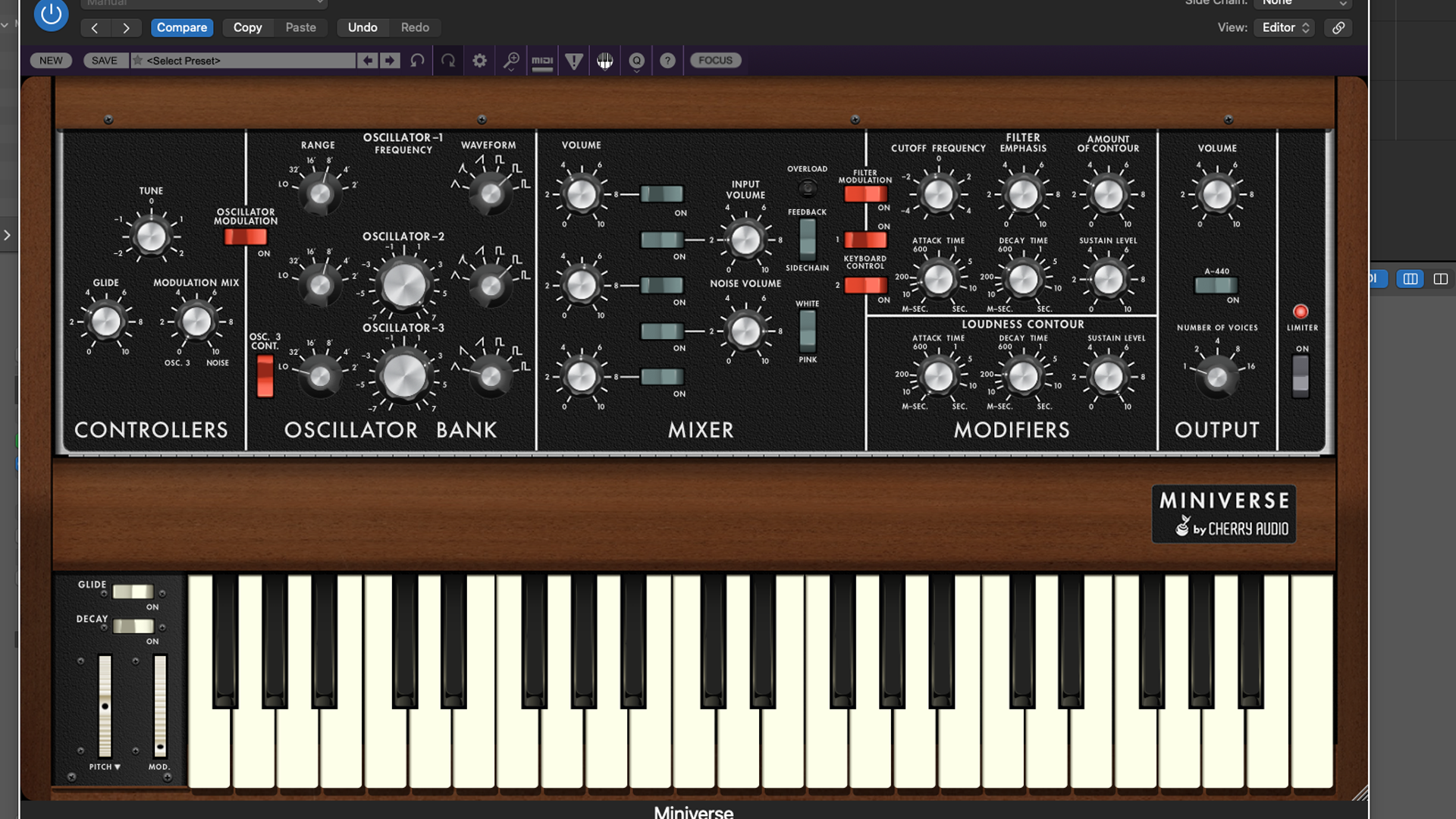
There are many Roland-inspired synths that will do an admirable job, as will most DAW-based synths which offer a subtractive architecture, but we are going to use Cherry Audio’s Miniverse synth; being based on the Minimoog, it offers some useful flexibility.
Set up the first synth on a track of your DAW, and let’s get programming!
Step 2 – VCO Pitch
Firstly, initialise a patch, so that we start from a default setting. We are going to use Oscillator 1 and 2; we want to re-create the slightly reedy sound that we can hear on the track.
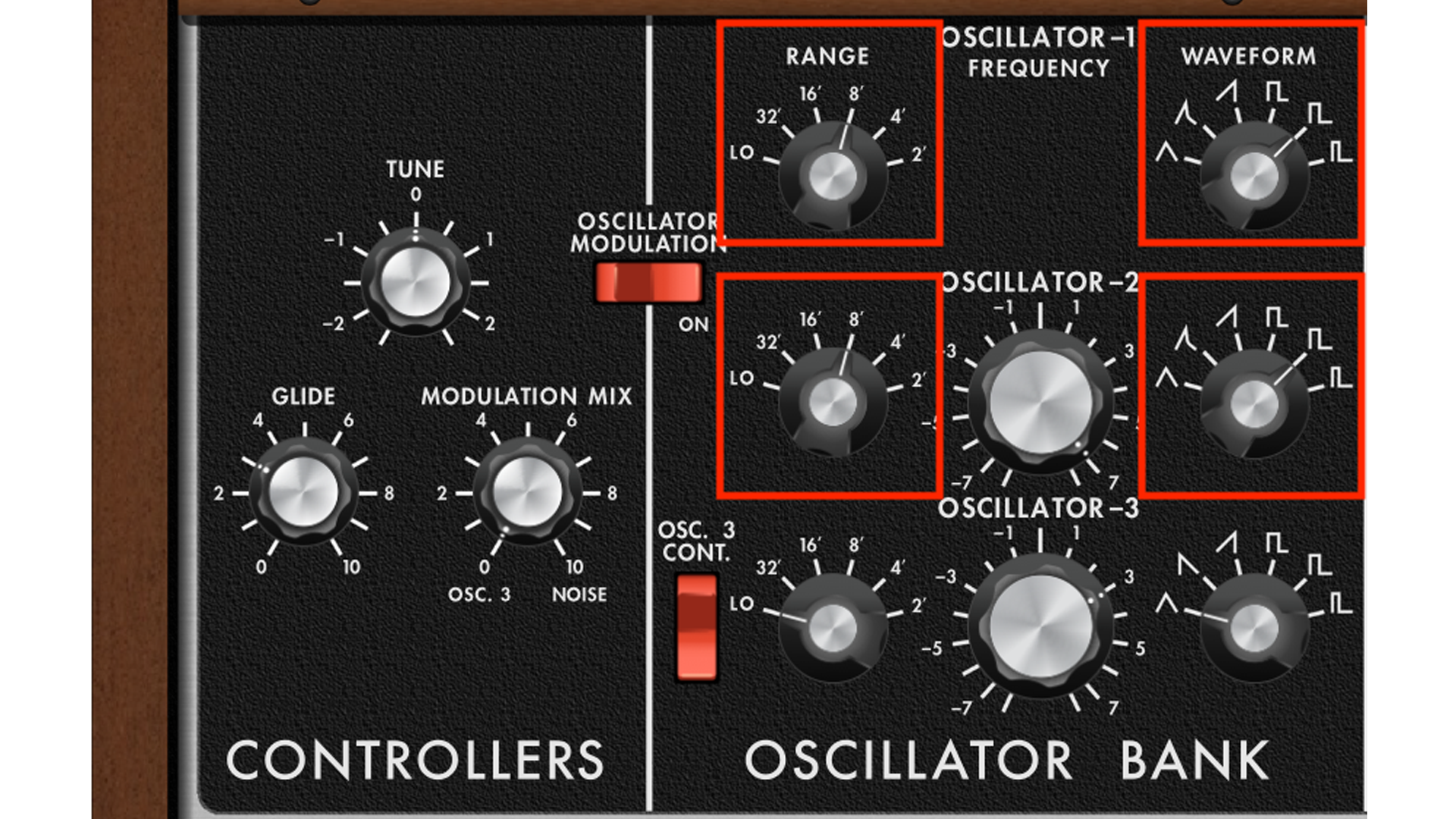
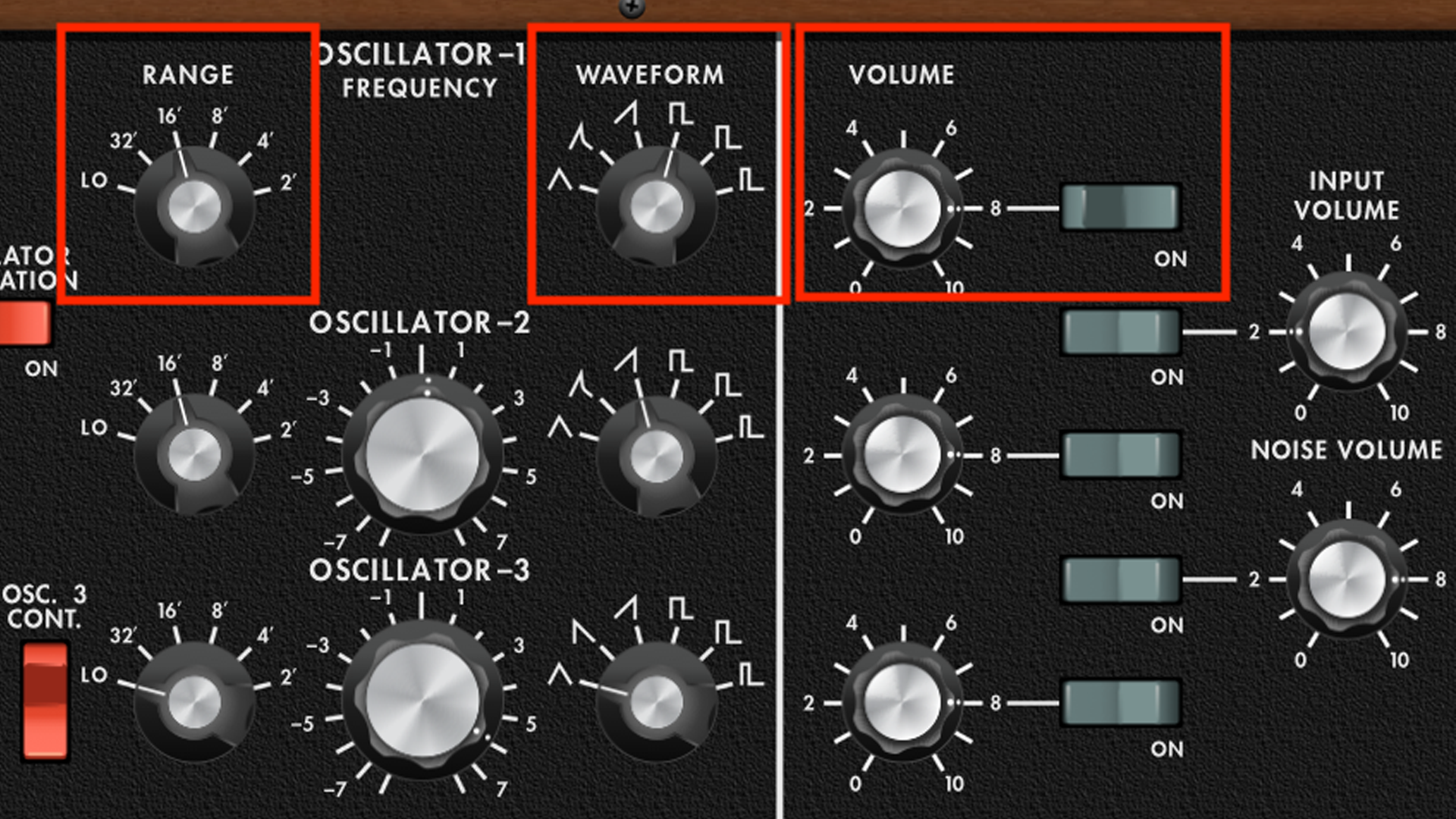
Beginning with Oscillator 1, select the wide rectangle shape via the Waveform selection pot. If you are working with a different synth, you can select a square/pulse, and slightly modulate the wave using manual PWM. Set the range to 8’, then duplicate these settings on Oscillator 2.
Step 3 – VCO 2 Pitch
If you listen really carefully to the opening riff on the track, you can hear that there is a part playing a perfect 5th higher than the bass part – actually it’s an octave and a 5th, but you get the gist!
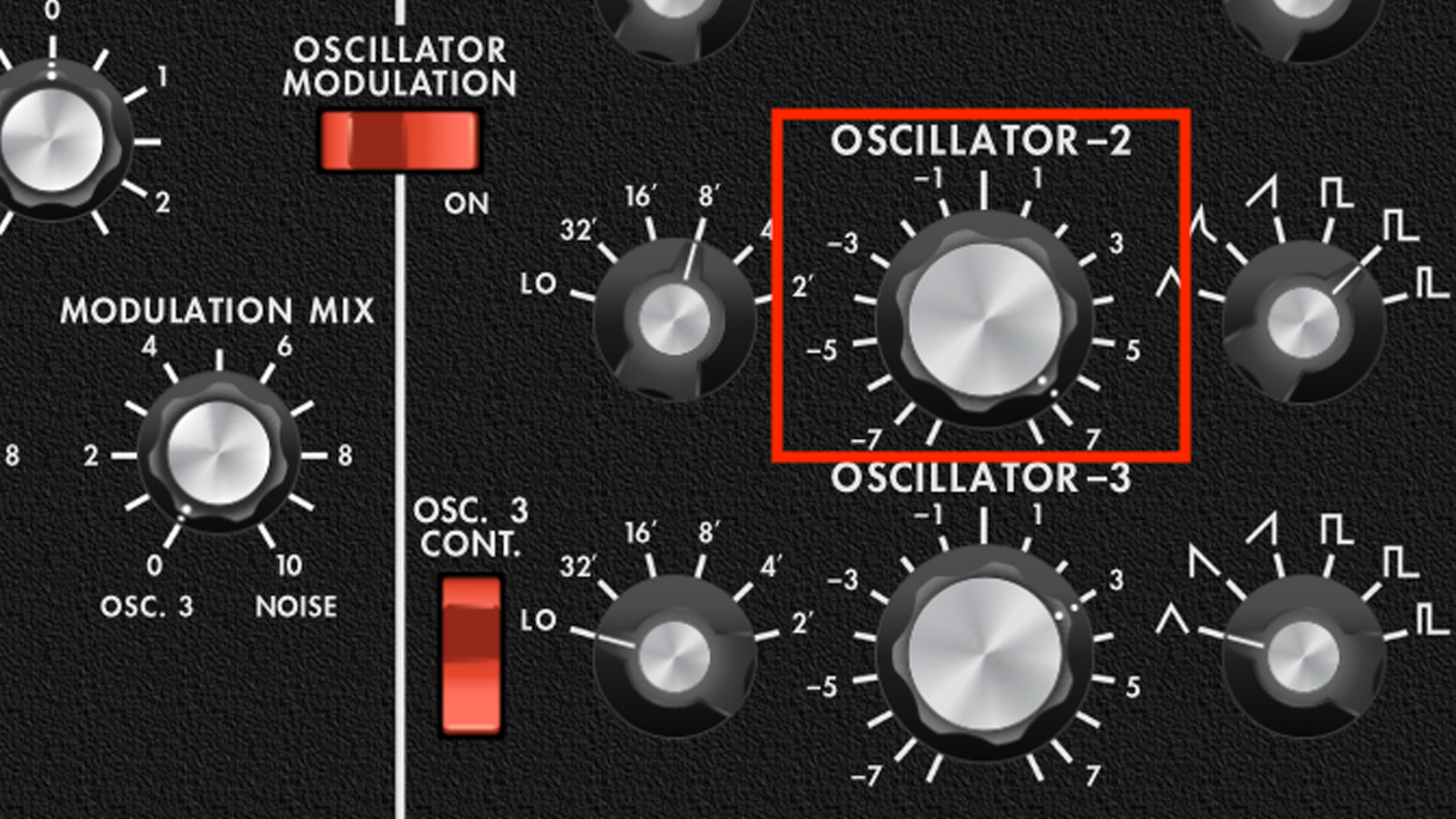
We can re-create this by revisiting Oscillator 2, and adjusting the variable pitch pot to a value of ‘7’. This translates as 7 semitones higher, which is the same as a perfect 5th.
Step 4 – Mixer
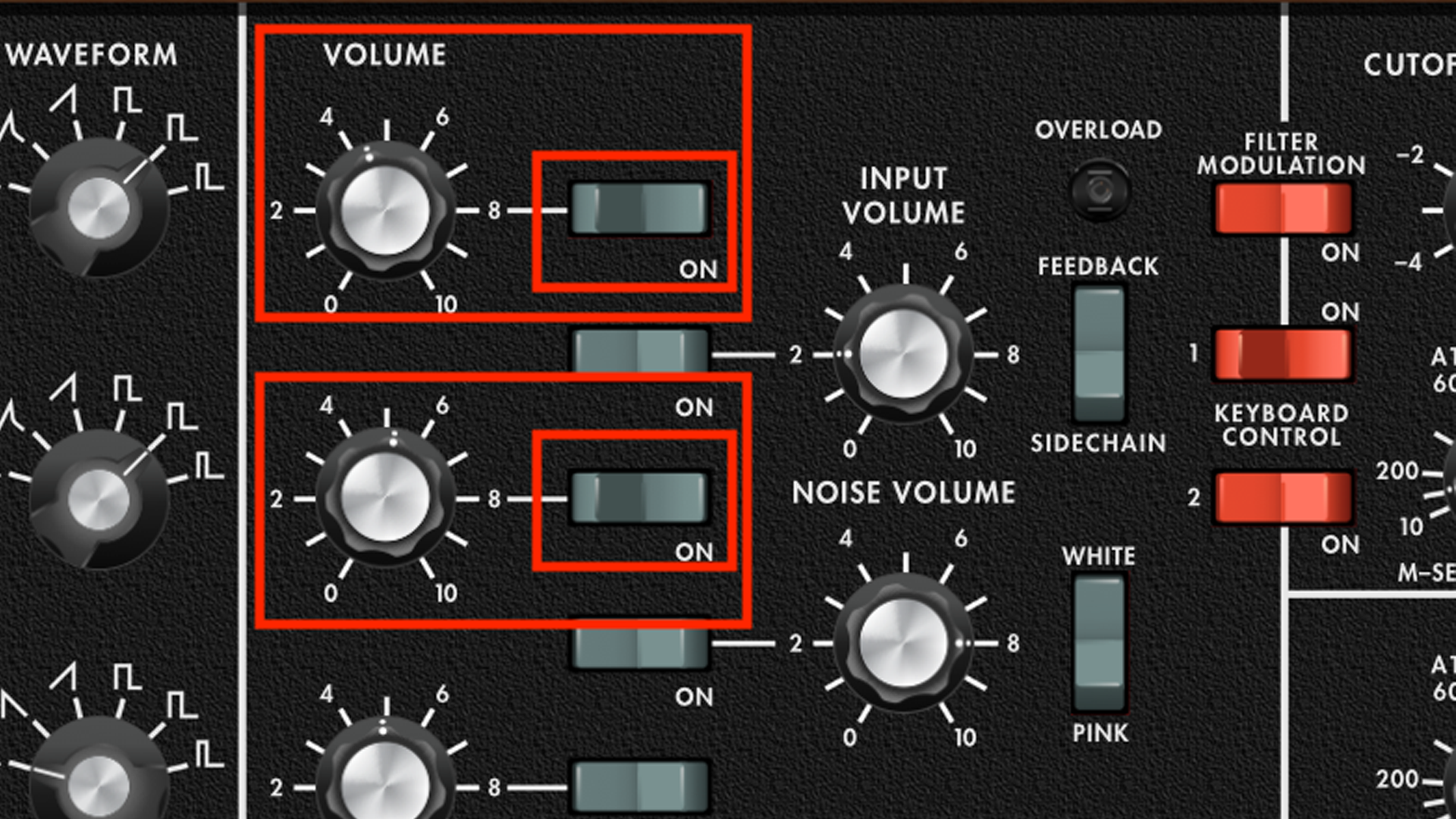
We need to adjust the balance of the two oscillators, which we do from the Mixer section.
Ensure that both oscillators are switched to ‘On’, then adjust the volume of each, so that Oscillator 2 is a little bit louder than Oscillator 1. Make sure that all other mixer elements are switched to ‘Off’
Step 5 – Filter
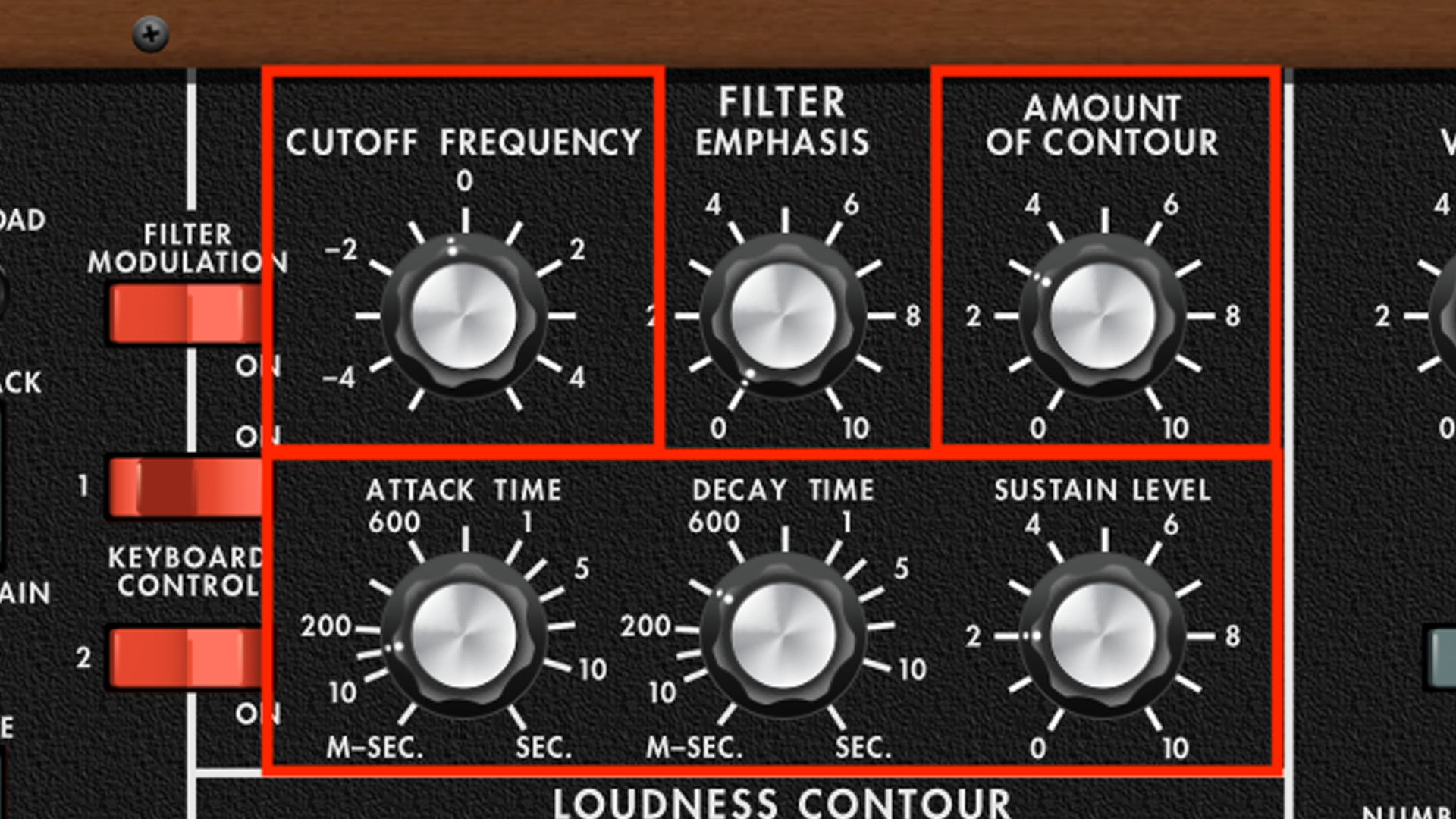
Next, we turn to the Filter section, where we need to engineer some brightness, with the help of the filter envelope.
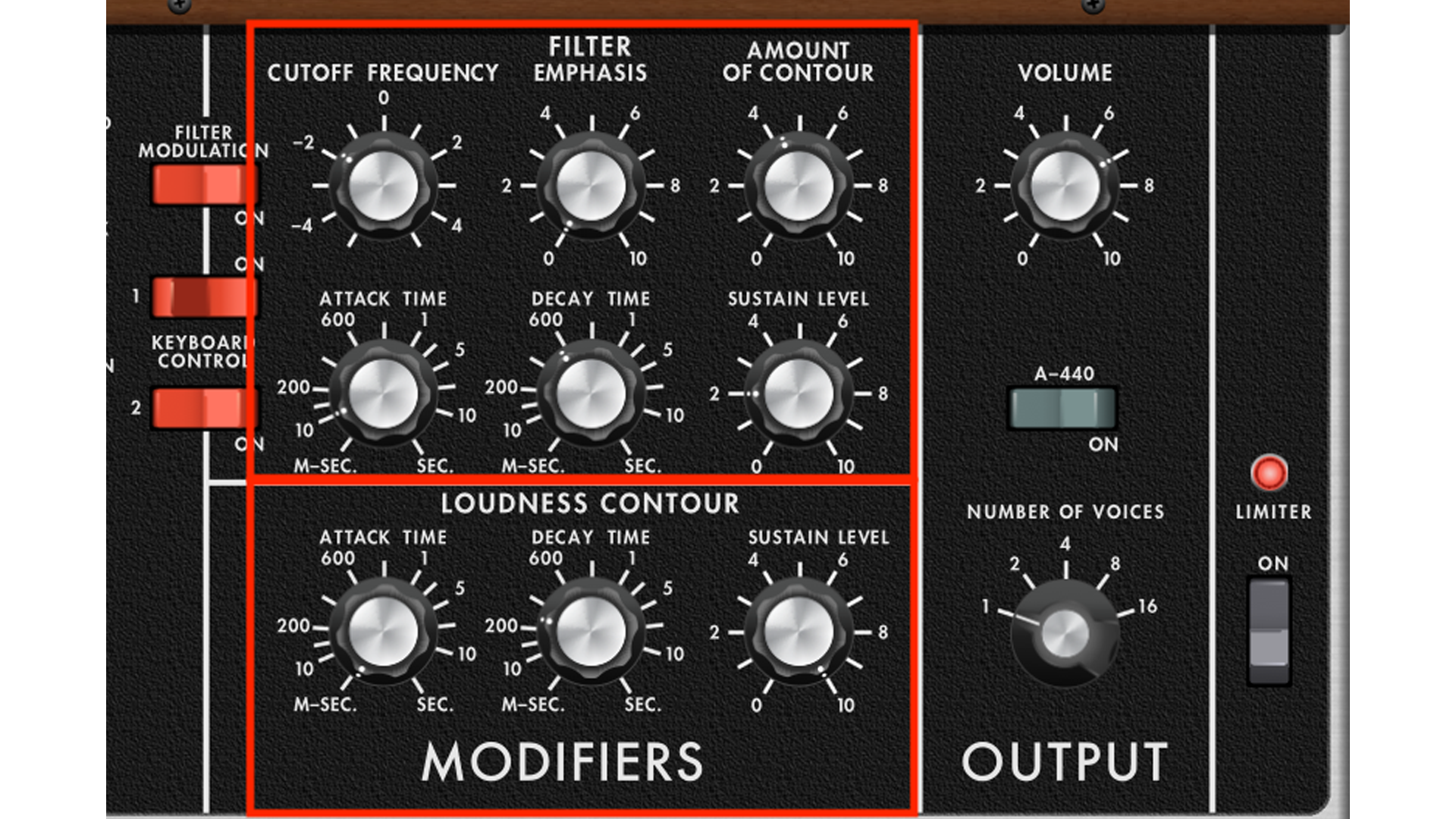
Replicate our settings across the filter, which includes adjusting the Amount Of Contour pot, to provide brightness at the front of each note. Notice that as we adjust the envelope settings, we have engineered a slight swell, using the Attack Time pot. There is also no resonance (aka Filter Emphasis) employed in this sound.
Step 6 – Loudness Contour
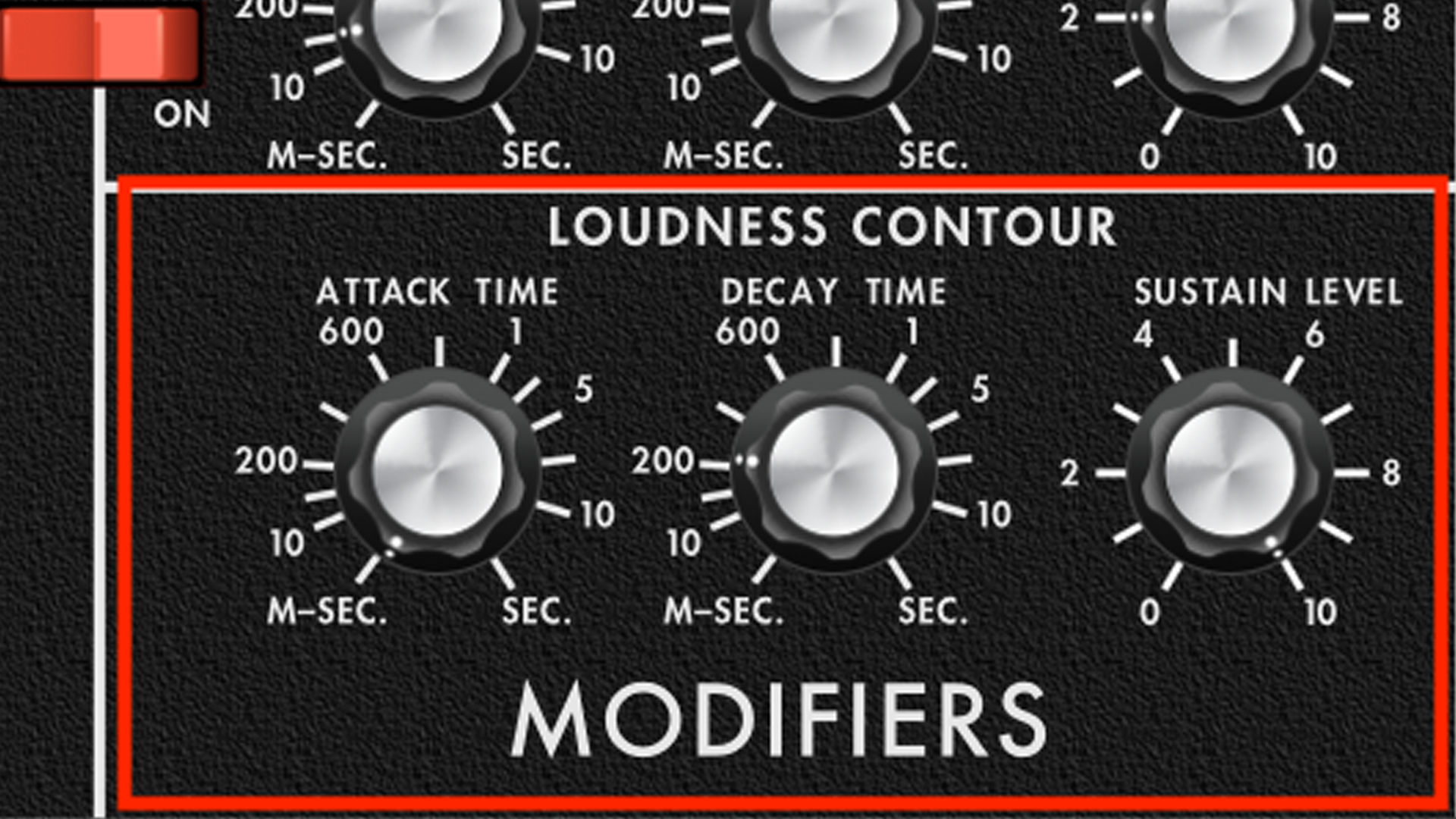
The volume or amplitude of our sound, is handled by the Loudness Contour section, which is Moog’s language for amplitude envelope.
Once again, we’ll use relatively short timings here. As the notes being played are quite short, the level of sustain remains high, to maximise the volume potential.
Step 7 – LFO
You may have already noticed that this sound does not feel overtly bass-like, but we will be addressing this shortly, with the addition of a second sonic element. However, there is one tiny subtlety in the sound, which we should engineer.
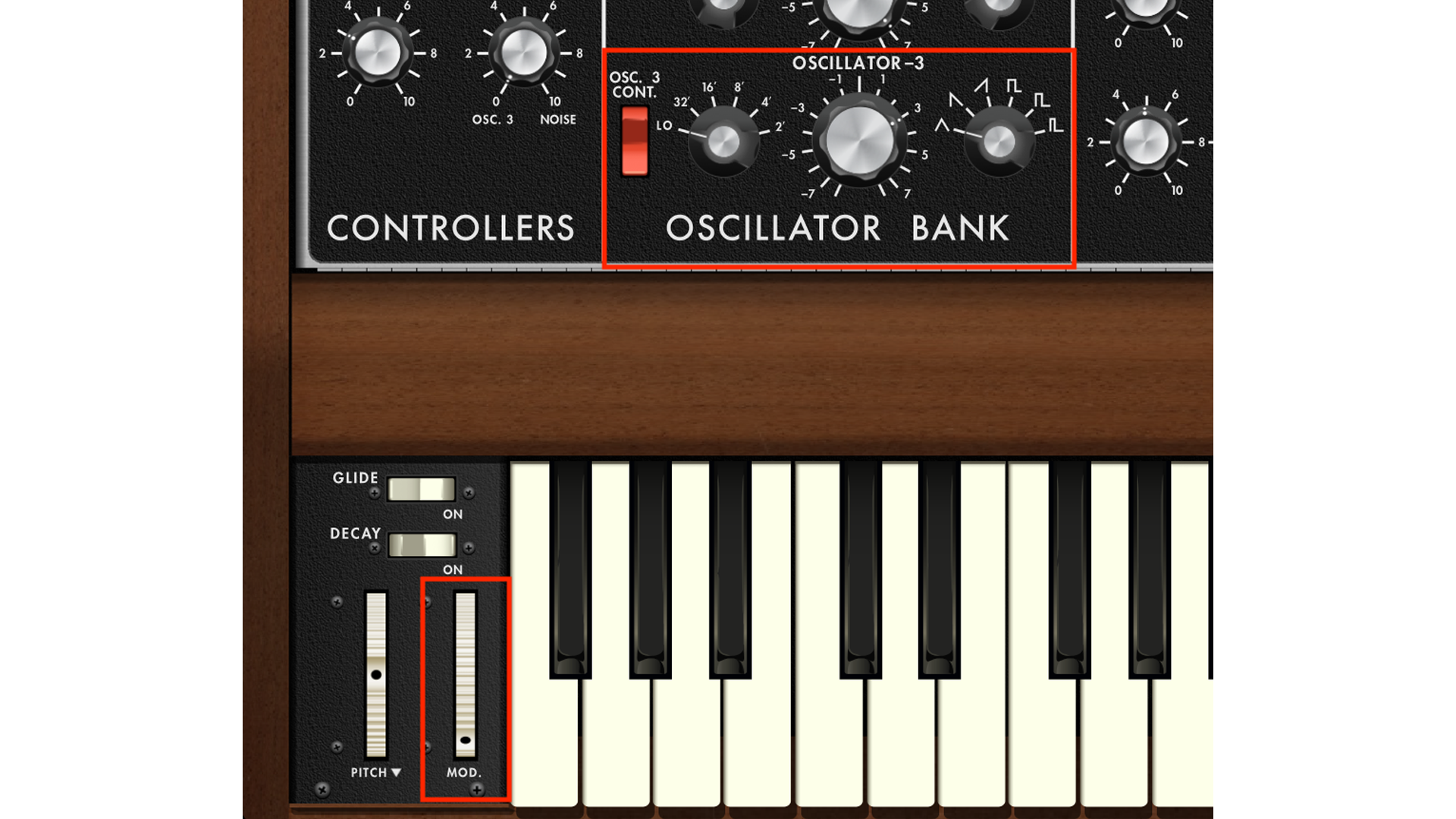
If you listen really closely, you can hear a tiny bit of modulation in the pitch. In order to achieve this using Miniverse (or many other Minimoog soft-synths) we have to employ Oscillator 3 as an LFO.
Visit the Oscillator 3 section, and ensure that the range is set to ‘Lo’. We also need to select the triangle wave, and we can adjust the frequency to suit our track – not too fast!
The easiest way to apply a small amount of modulation here, is by nudging the modulation wheel slightly, so that you get a tiny amount of pitch modulation. It’s subtle, but it will make a difference!
Step 8 – Bass
Having addressed what we could call the upper sound element, we are now going to re-create the bass element. The easiest way to do this is to employ another track, and use another instance of synth.
This will also mean that the LFO modulation, applied in the last step, will not apply to the bass part, which is exceptionally helpful.
Step 9 – VCO 1
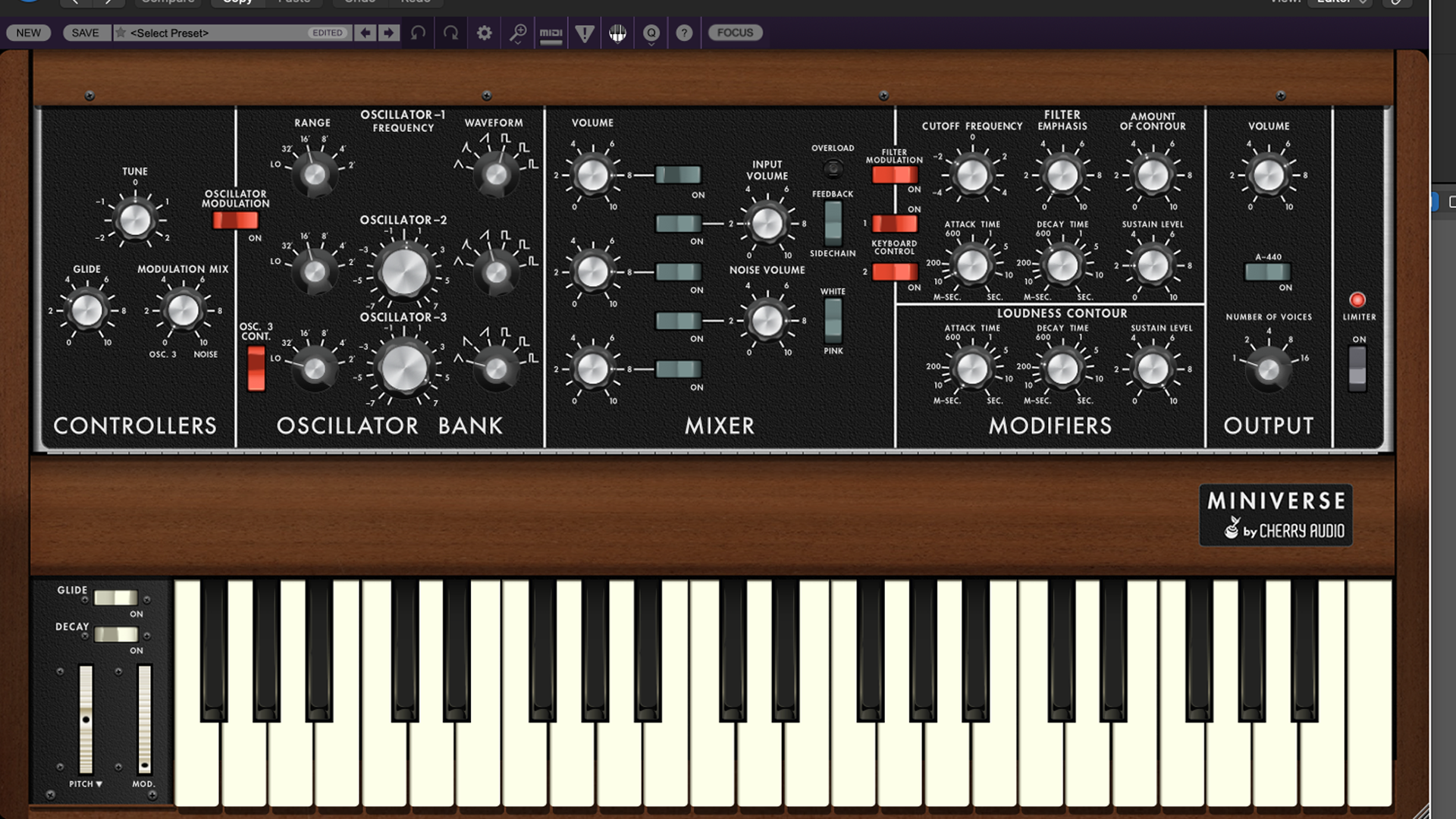
Compared to our previous sound, this is nice and simple. Start by initialising a patch. All we want is a basic square wave, generated by Oscillator 1, set to a healthy volume. Ensure that all other elements within the mixer section are switched off.
As this is our ‘true’ bass part, we want to set the range to ’16’, which will be one octave below our previously created sound.
Step 10 – Filter and Env
The filter and envelope settings are incredibly similar to the ones used in our last patch, so set up the filter and envelope sections, to create a nice snappy bass sound. Our screengrab below will guide you here, if you can’t quite remember what we did before.
Step 11 – The Riff
Now it’s time to record the riff, or more appropriately, try creating something of your own, but with the flavour of Don’t You Want Me.
A top tip is to work within a minor pentatonic key, which should sound great with the 5ths in the upper sound.
Once you have recorded your track for the upper sound, and you are completely happy with your playing and level of quantise, copy and paste the track onto the lower bass sound, and the same riff should play one octave below. You can also pay attention to the balance between the two sounds/tracks, so that it suits your production.
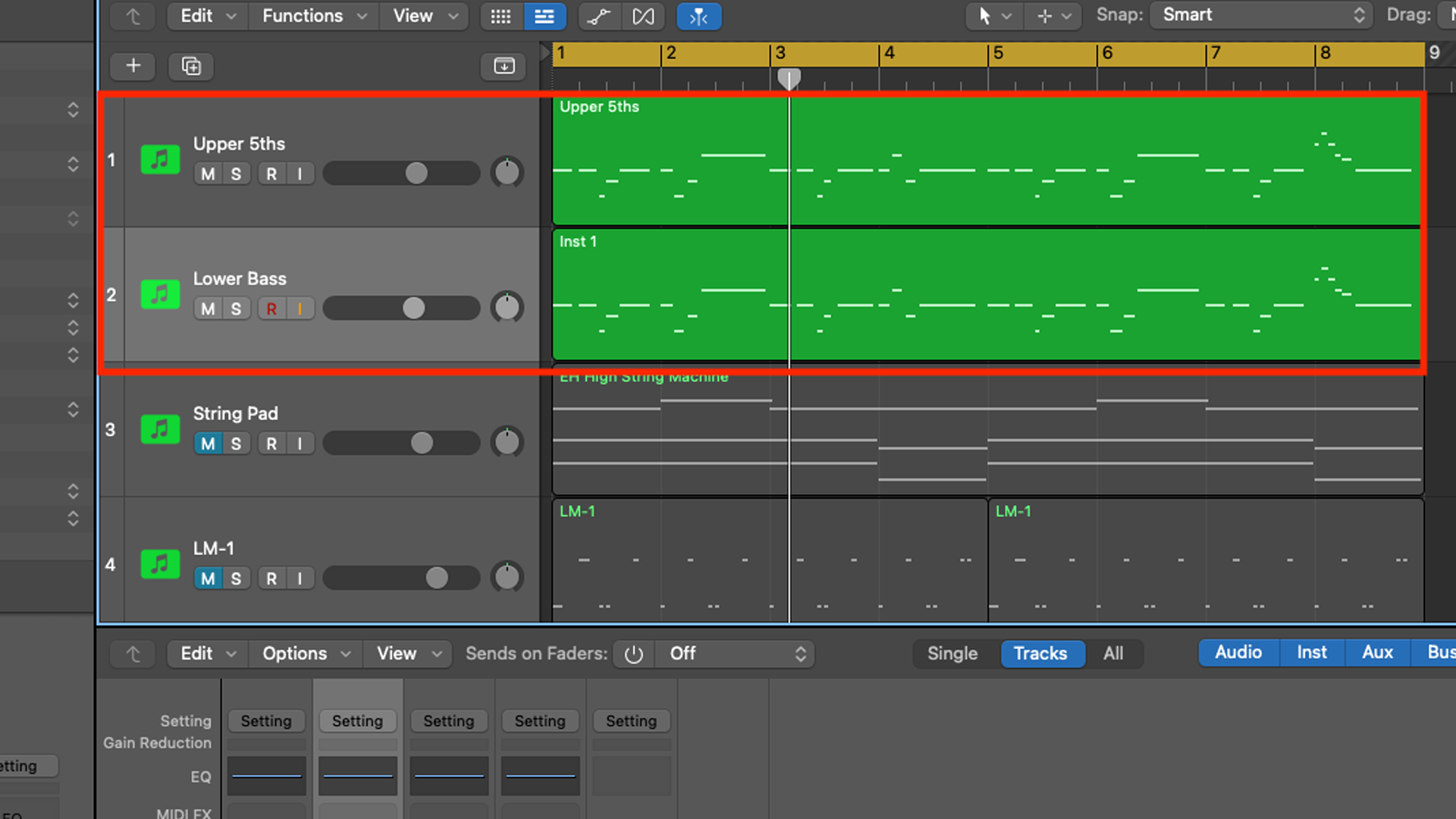
So there you have it – instant ‘cocktail bar’ vibes, without the need to spend thousands on a Roland System 700!